Reverse Tax Calculation Examples: Real Scenarios Solved
Worked reverse tax calculation examples for receipts, VAT invoices, reimbursements, and e-commerce, with actual numbers you can verify.
You get handed a stack of client expense receipts with tax-inclusive totals, a supplier invoice from London that lists one figure with VAT baked in, or a checkout confirmation that shows only the total and the tax. You need the pre-tax number to post the expense, reconcile the invoice, or reimburse an employee correctly. The worked examples below walk through the scenarios that actually show up in a bookkeeping inbox.
The formula is Pre-Tax = Total ÷ (1 + Tax Rate ÷ 100). For a full walkthrough of why dividing (not subtracting) is the right move, see our guide on how to calculate sales tax backwards. You can verify any example below using the reverse tax calculator.
Example 1: Standard US Retail Receipt
Scenario: You bought electronics in California and the receipt shows a $347.62 total. The tax rate is 10.25% (Los Angeles). You need the pre-tax price to submit an expense report.
Calculation:
- Divisor: 1 + 10.25 ÷ 100 = 1.1025
- Pre-tax: $347.62 ÷ 1.1025 = $315.31
- Tax paid: $347.62 − $315.31 = $32.31
Verification: $315.31 × 1.1025 = $347.63 (a one cent rounding difference, which is normal for amounts that don't divide cleanly).
The receipt itself should show the subtotal ($315.31) and tax ($32.31) broken out. If both figures tie to your calculation, the receipt is correct and you can post it with confidence.
Example 2: Restaurant Bill with Tip
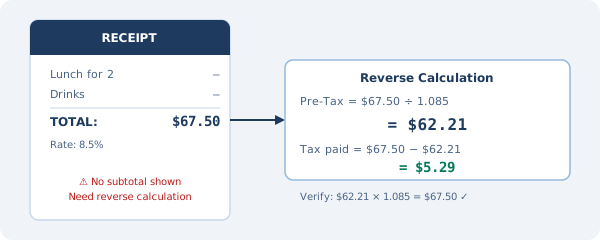
Scenario: Your team lunch total is $284.50. Tax was charged at 8.5% (Chicago combined rate). You need to record the food expense separately from the tax for your company's expense system.
Calculation:
- Divisor: 1.085
- Pre-tax food: $284.50 ÷ 1.085 = $262.21
- Tax: $284.50 − $262.21 = $22.29
If a tip was added on top of $284.50, the tip is not subject to sales tax and should not be included in this calculation. Subtract the tip before calculating.
Example: Total bill including tip is $340 ($284.50 + $55.50 tip):
- Remove tip first: $284.50 (the taxed amount)
- Pre-tax food: $262.21
- Record expense as: $262.21 food, $22.29 tax, $55.50 tip
Example 3: UK VAT Invoice
Scenario: You receive a supplier invoice from a UK company for £960 including 20% VAT. You need the net (pre-VAT) amount for your accounts, and you want to track the VAT separately (you're not VAT-registered, so you can't reclaim it, but you still need the split).
Calculation:
- Divisor: 1 + 20 ÷ 100 = 1.20
- Net amount: £960 ÷ 1.20 = £800
- VAT: £960 − £800 = £160
Record as:
- Professional services expense: £800
- VAT paid (non-recoverable): £160
If you are VAT-registered in the UK, the £160 goes to your VAT reclaim account, effectively reducing the net cost to £800.
Example 4: Australian GST on a Business Purchase
Scenario: Your business pays AUD $1,650 for office furniture, GST inclusive. GST in Australia is 10%.
Calculation:
- Divisor: 1.10
- Pre-GST: AUD $1,650 ÷ 1.10 = $1,500
- GST: $150
If you're registered for GST in Australia, you claim $150 as an input tax credit on your BAS (Business Activity Statement). Your net cost of the furniture is $1,500.
Example 5: E-Commerce Order with Marketplace Tax
Scenario: You ordered a product online for $89.99 total. The checkout showed "Tax: $7.38" but didn't show the subtotal. You want to verify the tax was calculated correctly and know the pre-tax price.
First, determine the implied rate: $7.38 ÷ ($89.99 − $7.38) = $7.38 ÷ $82.61 = 8.93%
Or use reverse calculation: $89.99 ÷ 1.0893 = $82.61 (if you know your local rate is approximately 8.93%).
To verify: If your combined local rate is 8.93%, then $82.61 × 1.0893 = $89.99 ✓
If you don't know the rate: The receipt or checkout confirmation almost always shows the applied rate. If not, use the IRS Sales Tax Deduction Calculator (irs.gov) to look up your ZIP code's combined rate.
Example 6: Subscription Renewal with Tax
Scenario: A SaaS subscription renews at $349.99 (inclusive of 9.38% Washington sales tax). You manage finances for the business and need to record this correctly.
Calculation:
- Divisor: 1.0938
- Pre-tax: $349.99 ÷ 1.0938 = $319.96
- Sales tax: $349.99 − $319.96 = $30.03
Record: $319.96 software subscription expense, $30.03 sales tax (non-deductible for most businesses, or a separate tax expense line).
Example 7: Back-Calculating Tax for an Annual Expense Report
Scenario: An employee submits a full year of receipts totaling $12,847.23 including tax. The receipts are all from Texas (average rate 8.20%). You need to record the pre-tax business expense total.
Calculation:
- Divisor: 1.082
- Pre-tax total: $12,847.23 ÷ 1.082 = $11,873.60
- Total tax paid: $12,847.23 − $11,873.60 = $973.63
If the receipts cover multiple states or tax rates, sort them into groups first, calculate each group at its applicable rate, and then sum the pre-tax totals. Running a single blended rate across mixed-rate receipts quietly introduces errors that compound as the stack grows.
Edge Case: A Tax-Inclusive Total Covering Multiple Rates
Hotel folios are the classic example. A single bill might include the room at one rate, a resort fee at a different rate, and parking at the general sales tax rate. If you run the whole total through a single reverse calculation, the numbers will not reconcile to the folio.
The fix is to treat each line as its own mini reverse calculation. Say a Denver hotel folio shows $612.40 total: a $450 room charge at 15.75% lodging tax, a $50 resort fee at 4.81% (Denver sales tax), and a $50 parking charge at 4.81%. Pull each line from the folio, divide each by (1 + its own rate), and sum the pre-tax figures. If the hotel only gives you a lump sum, ask for an itemized folio. Most property management systems can email one in about thirty seconds, and it saves you from guessing which rate applied to which line.
Handling Rounding
A few of the examples above land a penny off when you multiply back. That is the math doing what math does: you rounded the pre-tax figure to two decimals before multiplying, and the extra decimals you dropped have to go somewhere.
Tax authorities generally accept this rounding. For high-volume transaction processing, some systems carry additional decimal places internally before rounding the final output.
If you need exact verification on every transaction, keep the unrounded pre-tax value in your calculations and only round at the point of final recording.
When the Numbers Don't Reconcile
If the tax amount on a receipt doesn't match what the formula gives you, the most common explanations:
1. Different rates for different items: Mixed-taxability receipts apply different rates to different line items. The overall effective rate will differ from any single rate.
2. Tax was calculated on a different base: Some transactions apply tax to a discounted price, or tax a service charge separately.
3. Rounding: For small amounts (under $10), rounding can create apparent discrepancies of $0.01 to $0.02.
4. Error in the original calculation: Occasionally, a register or software applies the wrong rate. This is what our receipt tax verification guide helps you catch.
Try our reverse sales tax calculator for any of these scenarios. It handles any rate from 0% to 30% and gives you the full breakdown including the formula.