How to Calculate Sales Tax Backwards: Pre-Tax from Total
Learn the correct formula to calculate sales tax backwards. Find the pre-tax price from any tax-inclusive total without making the common subtraction mistake.
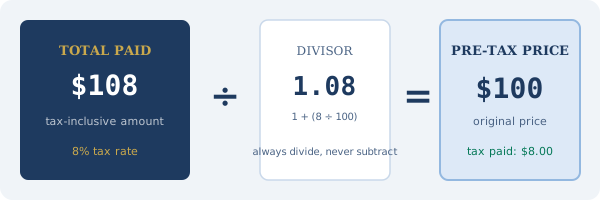
You paid $108.00 on a purchase where the tax rate was 8%. Working out the pre-tax price looks easy: most people guess $100, and for clean numbers like this they happen to be right. Try the same trick on $54.37 at 7.25% and the mental math falls apart.
Use Division, Not Subtraction
The formula looks like this:
> Pre-Tax Price = Total Amount ÷ (1 + Tax Rate ÷ 100)
For $108.00 at 8%: $108.00 ÷ 1.08 = $100.00.
That's the whole trick. If you only remember one thing from this page, remember to divide, never subtract.
Why Subtracting the Tax Percentage Gives the Wrong Answer
The usual wrong approach looks reasonable on the surface. Take $108.00, subtract 8% (which is $8.64), and you land on $99.36. You expected $100. The gap feels small here but compounds fast on larger totals.
The reason it fails is simple. When 8% tax was calculated at the register, it was calculated on $100, the pre-tax price. Subtracting 8% from $108 applies the percentage to $108 instead, which is $8.64. You're using the wrong base.
Division fixes this automatically. It accounts for the fact that the tax rate was applied to a smaller number, then the result was added back to that number.
A business reconciling dozens of receipts a month this way builds up meaningful errors by year end. Even a few cents per line item, multiplied across hundreds of transactions, lands in a range that an auditor will notice.
Walking Through the Math
Start with two inputs: the total you paid (including tax) and the tax rate that was applied.
Convert the rate to a decimal factor by dividing it by 100 and adding 1. For 8%, that's 0.08 + 1 = 1.08. For 9.5%, it's 0.095 + 1 = 1.095.
Divide the total by that factor. At 8%, $108.00 ÷ 1.08 = $100.00. At 7.25%, $54.37 ÷ 1.0725 = $50.69.
The tax amount is whatever's left: total minus pre-tax price. For our first example, $108.00 minus $100.00 equals $8.00 in tax.
Always sanity-check the result by running it forward. Pre-tax multiplied by (1 + rate) should land on the original total: $100.00 × 1.08 = $108.00.
Practical Examples with Real US Tax Rates
These use the average combined state-plus-local rates from the Tax Foundation's 2024 data:
California (8.68%)
- Total paid: $215.80
- Divisor: 1.0868
- Pre-tax: $215.80 ÷ 1.0868 = $198.57
- Tax paid: $17.23
Texas (8.20%)
- Total paid: $67.50
- Divisor: 1.082
- Pre-tax: $67.50 ÷ 1.082 = $62.38
- Tax paid: $5.12
Washington (9.38%)
- Total paid: $1,245.00
- Divisor: 1.0938
- Pre-tax: $1,245.00 ÷ 1.0938 = $1,138.51
- Tax paid: $106.49
For quick work, our reverse tax calculator runs all of this for you: enter the total and rate, get both numbers back.
How to Find Your Sales Tax Rate
Three reliable sources:
1. Your receipt: most retailers print the tax rate applied, usually near the tax line.
2. Your state's Department of Revenue website: search "[your state] sales tax rate lookup" for an official ZIP-code tool.
3. The IRS Sales Tax Deduction Calculator (irs.gov): gives combined state-plus-local rates by ZIP code, useful for itemized deductions.
Your receipt will always show the exact rate for that specific transaction. Preset rates (like the state averages in our calculator) are useful approximations but won't match every location exactly.
Receipts With Multiple Tax Rates
Some receipts apply different rates to different items. Grocery stores are the classic case: unprepared food taxed at one rate (or zero), prepared food at another, and household goods at the standard rate. Restaurants sometimes split the check between food and alcohol when those categories are taxed differently at the local level.
When that happens, you can't reverse-calculate a single pre-tax total from the grand total. You have to work each category separately. Pull the subtotal for each taxed group, reverse-calculate using that group's rate, then add the pre-tax subtotals back together. The receipt usually flags items with letters like "T" or "F" in the item column to show which rate applied.
How Accounting Software Handles It
QuickBooks, Xero, FreshBooks, and Wave all do this math internally when you enter a tax-inclusive amount and flag the transaction as including tax. You type the total, pick the rate or tax code, and the software splits it into a pre-tax expense line and a tax line on the back end. That's why properly tagging transactions as tax-inclusive versus tax-exclusive in your accounting system matters. If you miscode it, the software stores the wrong pre-tax number and your expense reports drift off.
Rounding Edge Cases
Prices are stored to the cent, but the math behind a reverse calculation often produces a third decimal. A $54.37 total at 7.25% works out to $50.6946... before rounding. Standard practice is to round to two decimals, which gives $50.69.
That rounding can create a one-cent difference when you verify the receipt. Pre-tax of $50.69 multiplied by 1.0725 is $54.365, which rounds to $54.37, so the forward check works. But if you subtract to find tax ($54.37 minus $50.69 = $3.68) and compare it to 7.25% of $50.69 ($3.6750, rounded to $3.68), everything lines up. Other combinations round the other direction and leave a penny unaccounted for. A penny difference on a verification is rounding, not a mistake.
Special Situations
Tips and service charges: Don't include tips in your total before calculating. Tips are applied after tax and aren't subject to sales tax themselves. Calculate the pre-tax price from the food-and-drink subtotal, then handle the tip separately.
Online purchases from other states: Since the 2018 South Dakota v. Wayfair Supreme Court ruling, online retailers must collect sales tax in states where they have "economic nexus" (usually over $100,000 in sales). The rate applied is the destination state's rate, meaning the state you're shipping to.
When to Use This Calculation
The most common situations where you need to back-calculate sales tax:
- Bookkeeping: recording the pre-tax amount of a business expense
- Reimbursements: figuring out the taxable vs. non-taxable portion of an employee expense
- Price comparison: comparing posted prices across different tax jurisdictions
- Receipt verification: confirming the merchant charged the correct rate
Our guide to verifying receipt taxes walks through the verification process in detail.
The Formula in Different Forms
For a spreadsheet or programming context, the three formulas are:
Pre-Tax = Total / (1 + TaxRate/100)
Tax Amount = Total - Pre-Tax
Effective Rate = (Tax Amount / Pre-Tax) * 100
In Excel or Google Sheets: if A1 contains the total and B1 contains the rate, enter this formula into a cell: =A1/(1+B1/100)
That cell gives you the pre-tax price directly.
Summary
Calculating sales tax backwards means dividing the total by (1 + the rate as a decimal). The critical point is that you divide. You don't subtract. Subtraction gives a wrong answer because the tax was calculated on the pre-tax price, not on the total.
Use our pre-tax price calculator for instant results on any total and rate, including US state presets and custom percentages for VAT or GST.