How to Verify the Tax on Your Receipt Is Correct
Retailers occasionally charge the wrong sales tax rate. Here's how to verify your receipt in under two minutes, with the formula and a free calculator.
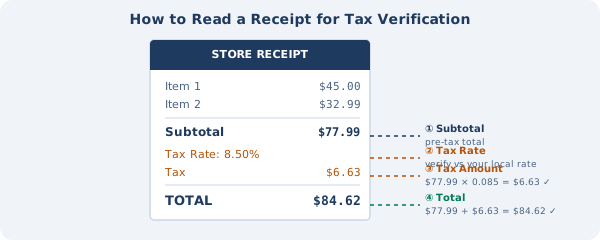
Point-of-sale systems get tax right more often than not, but errors creep in at rate changes, software updates, and store relocations. A POS that wasn't reprogrammed after a local rate change, a SKU miscategorized as taxable when it should be exempt, a store that moved across a jurisdiction line and kept the old settings: any of these can produce a wrong number on your receipt. For small purchases it rarely matters. On a larger purchase, a two-minute check is worth the time.
What follows is how I work through a receipt when something looks off.
What You Need
- Your receipt (physical or digital)
- The tax rate that should apply to your purchase (your local combined rate)
- About two minutes
You don't need special software. The math is straightforward, and our reverse tax calculator handles the calculation if you'd rather not do it manually.
Pulling the Key Numbers off the Receipt
Most US retail receipts show:
- Subtotal: the pre-tax total
- Tax Rate: the percentage applied (e.g., "8.50%")
- Tax: the dollar amount of tax charged
- Total: subtotal plus tax
If all four are there, verification is straightforward: multiply the subtotal by the rate and compare the result to the tax amount on the receipt.
Example:
- Subtotal: $87.43
- Tax Rate: 8.50%
- Tax charged: $7.43
- Expected tax: $87.43 × 0.085 = $7.43 ✓
Some receipts only show the total and the tax amount, without the subtotal or rate broken out. For those, reverse calculation is the way in.
Looking up What the Rate Should Actually Be
The rate on your receipt might be correct, or it might be what the retailer thinks is correct. Those aren't always the same thing.
A few places to find the real rate:
Your state's Department of Revenue website is the authoritative source. Most have an address-based or ZIP code rate lookup tool. Search "[your state] sales tax rate lookup."
The IRS Sales Tax Deduction Calculator on irs.gov is another option. It provides combined state-plus-local rates by ZIP code.
Finally, the state preset rates in our calculator work as a quick sanity check. They're combined averages, so they won't match every locality to the cent, but they're close enough to catch a meaningful error.
Running the Math
With the subtotal and rate on the receipt:
Expected tax = Subtotal × (Rate ÷ 100)
Compare that to the tax amount on the receipt. Small discrepancies of a penny are almost always rounding. Larger gaps depend on the purchase size: a few cents on a small purchase isn't really worth your time, but the same few cents scaled across a $5,000 equipment order is a different conversation.
When you only have the total and want to back-calculate, use the reverse tax calculator. Enter the total and the rate that should have applied, then compare the calculated tax amount to what's on your receipt. The full formula and why subtracting the tax percentage gives you the wrong answer are covered in our guide to calculating sales tax backwards.
Example:
- Total: $94.86
- Correct rate for your location: 8.50%
- Calculated pre-tax: $94.86 ÷ 1.085 = $87.43
- Calculated tax: $94.86 − $87.43 = $7.43
If the receipt shows $7.43 in tax, it's correct. If it shows $8.54, something's wrong.
Common Receipt Tax Errors
Wrong rate applied. The most common issue. A retailer hasn't updated their POS system after a local rate change, or they're using a statewide average instead of the combined local rate. Usually a small difference (fractions of a percent) but compounds on large purchases.
Tax on exempt items. Some jurisdictions exempt groceries, prescription drugs, or clothing. If you bought exempt items and the receipt shows tax applied to them, the retailer may be miscategorizing the items. Many grocery store POS systems separate taxable and non-taxable items automatically, so errors usually show up when individual SKUs are coded wrong in the system.
Duplicate tax line. Rare, but occasionally a system error charges tax twice, once on the subtotal and again on the tax-inclusive amount. If your receipt shows two tax line items, verify both are correct.
Wrong jurisdiction. Online orders and delivery services sometimes apply the wrong jurisdiction's rate. A delivery address in an unincorporated county area might get the city rate applied by mistake.
When a Small Error Matters Most
Most $0.50 tax errors on retail purchases aren't worth disputing. They are worth noting in these situations:
Business expense reports: If you're filing a T&E report and the tax amount needs to match exactly, any discrepancy creates reconciliation issues.
Large purchases: A 0.5% rate error on a $10,000 purchase is $50. On a $50,000 equipment purchase, it's $250.
Repeated purchases from the same vendor: If a supplier consistently applies the wrong rate, the cumulative error grows quickly. Bookkeepers catch this in quarterly reconciliations.
Tax refund calculations: If you're computing how much sales tax you paid for Schedule A itemized deductions, accuracy matters for the total.
How to Dispute a Receipt Tax Error
If you find an error and want to correct it:
1. At the time of purchase: Alert the cashier. They can void and re-ring the transaction correctly, or a manager can issue a partial refund for the overcharge.
2. After the fact: Contact the retailer's customer service with your receipt. Most retailers will refund a documented overcharge. They're also required to remit the correct tax, so they have their own reason to fix their system.
3. If the retailer won't correct it: Contact your state's Department of Revenue. They investigate complaints about retailers charging incorrect rates and can audit the retailer.
Using the Reverse Calculator for Verification
The fastest verification method: drop your receipt total and the rate you believe should apply into our pre-tax price calculator. Compare the calculated tax amount to what's on your receipt.
Match? You're done. If the numbers don't line up past a cent or two of rounding, either the rate applied was different from your local rate, or there's a calculation error somewhere on the receipt.